Bramble Early Years
A warm early-years brand template organized around the child's daily rhythm, age stages, curriculum, and family visits
A warm early-years brand template organized around the child's daily rhythm, age stages, curriculum, and family visits
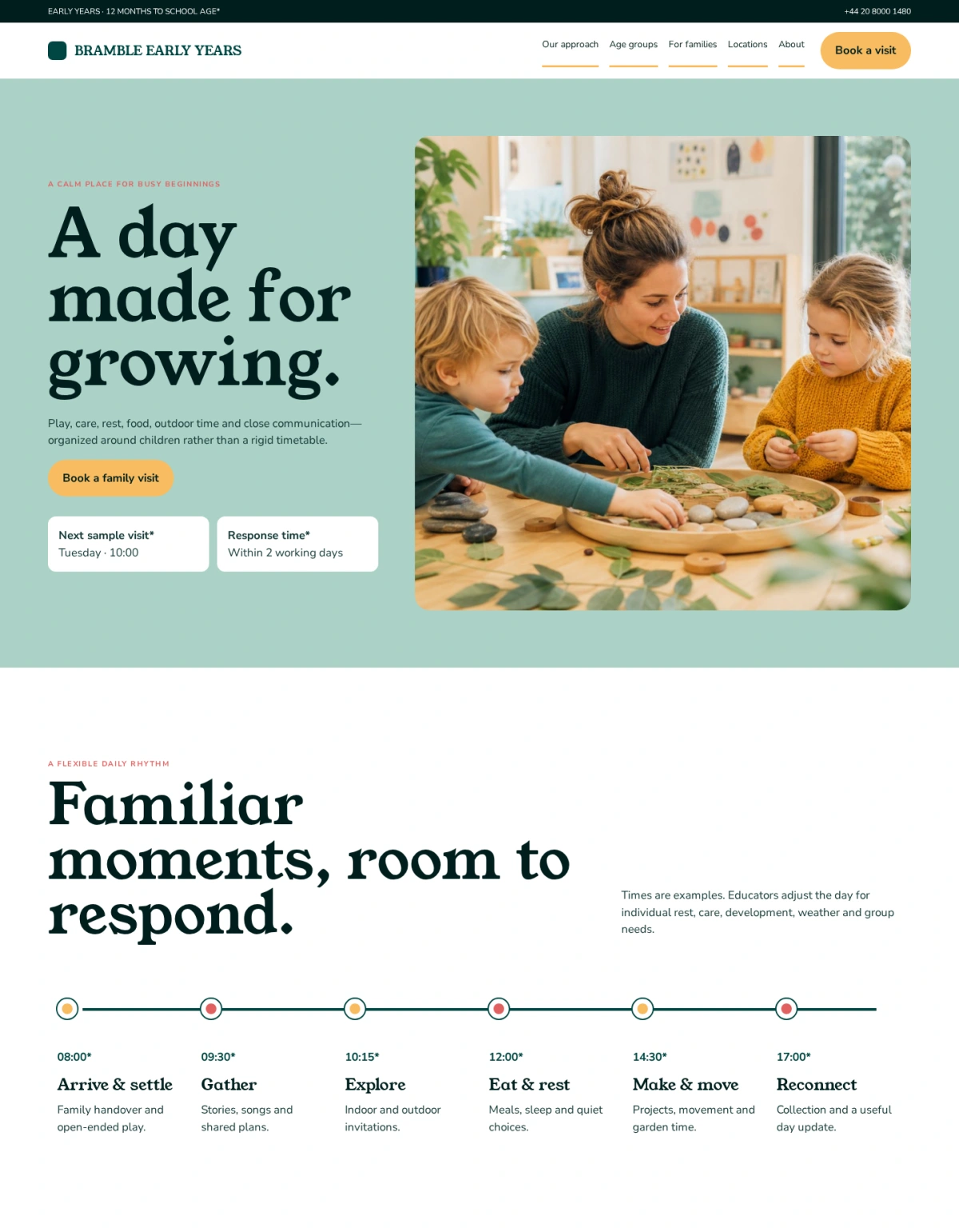
Bramble Early Years replaces a generic school catalogue with a parent-centered day journey. A visit-led but bounded hero moves into a responsive daily rhythm, keyboard-ready age-stage tabs, observable-practice accordion, role-based educator introductions, family visit checklist, and location-specific opening-hours table. A softly rounded square logo becomes the recurring container shape without turning the layout into a scrapbook. Happy Hues Palette 10 supplies deep green trust, mint calm, warm-yellow visit actions, coral checkpoints, pale-paper content surfaces, and dark-teal readability. Young Serif and Nunito Sans create a gentle Scandinavian character while preserving strong information hierarchy and accessibility.
Choose this template for a childcare center, nursery, preschool, early-learning network, family day-care provider, or community education program.
Replace the Bramble wordmark with a transparent logo and prepare simplified versions for small screens and dark backgrounds. Keep the shared container edges, generous whitespace, consistent gutters, restrained rounded corners, and predictable section padding. The warmth should come from authentic content, color, photography, and illustration rather than loose scrapbook composition.
Rewrite the hero for the real age range, location, educational approach, and next step. The age selector should link to substantial pages that explain routines, staffing, learning priorities, transitions, meals, rest, outdoor time, and family communication. The daily rhythm is a guide rather than a rigid promise, so explain how educators respond to individual needs. Curriculum statements should describe observable practice and avoid unsupported claims about accelerated development or guaranteed outcomes. Publish current operating hours, closure dates, fees, subsidies, enrollment steps, waitlist policy, inclusions, required supplies, illness rules, medication procedures, and contact routes.
State staff qualifications, safeguarding checks, ratios, licenses, accreditations, and inspection results only when verified for the named location and jurisdiction. Never invent parent testimonials, awards, availability, or developmental statistics. Replace every photograph and illustration with licensed material that accurately reflects the real environment. Obtain written permission for identifiable children and staff, avoid publishing names or sensitive details, and provide a withdrawal process. Do not use generated imagery to imply facilities, educators, diversity, accessibility features, outdoor spaces, or activities that do not exist.
Keep important text, schedules, prices, policies, and actions outside images so editors can update them and assistive technology can read them. Add descriptive alternative text without identifying children or inferring personal characteristics.
Forms should collect only what is necessary to arrange a visit or begin enrollment, explain who receives the information and when families can expect a reply, and move sensitive health or identity documents into a secure authenticated workflow.
For SEO, create complete pages for each real location, age program, educational approach, and family resource. Use unique titles, descriptions, canonical URLs, logical heading structures, local contact details, and useful internal links. Avoid thin pages created solely for suburb or keyword variations. Use structured data only when visible details such as address, opening hours, and telephone are accurate.
If the site is multilingual, localize family terminology, enrollment instructions, dates, policies, support contacts, and legal notices rather than translating navigation alone.
On mobile, stack the hero in reading order, turn the daily schedule into a vertical timeline, keep tabs keyboard-operable, and let the opening-hours table reflow without horizontal overflow. Maintain strong contrast, visible focus, large touch targets, reduced-motion support, and clearly labeled accordions and form errors. Optional analytics, maps, chat, video, and social embeds should remain disabled until consent where required, with a persistent preference control.
Before launch, replace all fictional names, addresses, hours, staff biographies, photographs, availability, policies, and claims. Test navigation, visit booking, enrollment inquiries, validation, spam protection, keyboard use, screen readers, responsive layouts, performance, privacy choices, and error states. Add reviewed privacy, terms, accessibility, safeguarding, complaints, health, emergency, fee, and cancellation information appropriate to the service. Assign a content owner at every location and schedule regular reviews so hours, places, staff, programs, and policies remain current.